
50 Shades of Guitar   
  • HOME
  • BLOG
  • SLOWmusic
  • SHOP AREA

Home recording of acoustic guitar through a microphone and piezo DI - how to do it yourself in 5 short steps,

3/4/2017

0 Comments

 
Even if your home studio is not yet prepared with acoustic adaptation you can always look for  "ways out" to record acoustic guitars in acceptable quality. 

Here is a try with Audio Technica ATM450 cardioid condenser microphone (199 Eur, new) via TC Electronic Desktop Konnekt  Firewire interface (80 Eur, used)
​

Here's how to do it in 5 short steps:

  • Place the mike as close to the instrument as possible without interrupring your playing comfort. By doing so you minimalize room influence. In my case this is about 20 cm from 12th fret. This placement gives pretty big and balanced sound of the guitar. At the same time it gives quite a lot finger/string noise but that is what I  don't mind at all as a listener :)
  • Make sure you optimize gain level of mic-pre so that you are able to capture full dynamic range of your instrument without overdriving the signal. That overdrive is heard as unpleasant buzz and is visible as signal peaks in you DAW that reach the borders or audio track/region. The distorted signal is impossible to repair in further process. So consider input gain setting as the MOST IMPORTANT part of recording process and take enough time to optimize the signal level.
  • Connect your guitar output to another input in the audio interface  - it should be "instrument" or "Hi-Z" input if available. Here adjust the gain properly as well.
  • If you're recording with metronome or backing track then get a closed headphones and  adjust the mix for maximum aural comfort. Make sure you'll be using direct monitoring to avoid any latency. If your AI doesn't have a direct monitoring output then better use open type headphones and adjust the backing level so that you can hear your guitar acoustically well but no backing tracks nor metronome beep shall be present in recorded signal.
  • Be realaxed in your whole body and mind when playing. Make sure you've practiced enough and you know the music.  If not you'll probably get annoyed and tired of making millions of takes. Usually you should get the music nailed in 3-5 takes.  That applies to memorized music, if you record improvised parts then it can take easily more takes. Anyway after recording 3-5 takes get a break, listen to them and decide what to do with them.

Don't forget that this is not a studio situation. It's always a compromise and you can't reach studio quality without spending lots of money on room adaptation and purchasing studio-level gear. What you can obtain is acceptable sound quality. That should be enough for demos or promo recordings and it should cost really small money. Do not invest in expensive gear - rather make sure your hardware and software is simple to operate, user-friendly and has all features important for the situation. And the situation is: we are recording musiacian and recording engineer at the same time. 
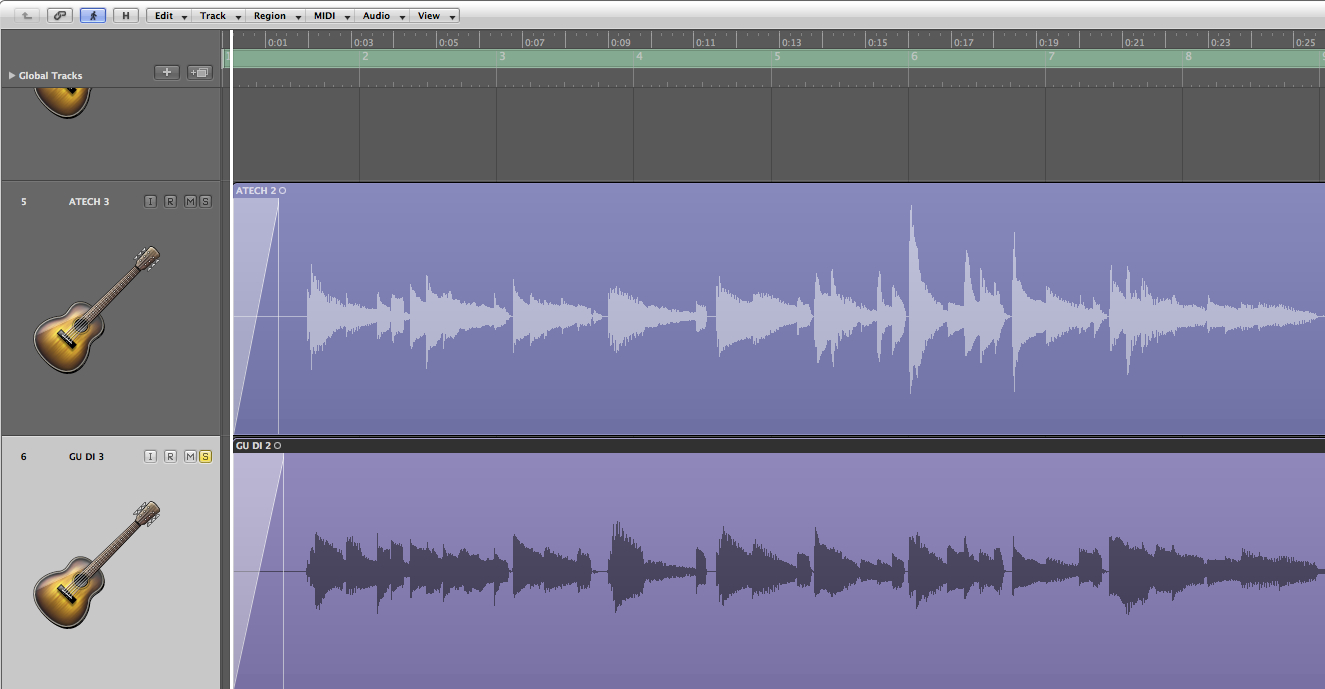
Picture
Waveforms of recorded guitar - cond. mike on top - notice the big dynamic range without touching track borders to avoid signal distorsion

Here we go - press rec and play :)

The guitar is a Guild F65CE medium deep body with cutaway - so not the biggest sounding guitar.  I mixed the piezo DI signal appr. 35% and microphone appr. 65 %.


​Below you can as well have a listen to 100% dry tracks, without any effects:
atm450_dry_acg.mp3
File Size: 1510 kb
File Type: mp3
Download File

piezo_di_dry_acg.mp3
File Size: 1510 kb
File Type: mp3
Download File

0 Comments


Leave a Reply.

      Subscribe to the blog:

    Subscribe

    Categories

    All
    Ear Training
    Gear
    Groove Guitar
    Guitar Technique
    Home Recording
    Improvisation
    Jazz Guitar
    Music And Life
    Music Theory
    Transcription

    Archive

    June 2017
    May 2017
    April 2017
    March 2017
    February 2017
    January 2017
    December 2016

    RSS Feed

Header Photo: Frank Krestan        © COPYRIGHT SLOWmusic  2016.
​.
  • HOME
  • BLOG
  • SLOWmusic
  • SHOP AREA